


Saving money on prescriptions sounds simple until you are standing at a pharmacy counter, trying to decide whether to use insurance, a discount coupon, or the price already shown by the pharmacy. That is where SingleCare - Rx Coupons becomes useful. I found it most valuable as a quick comparison tool for prescription purchases, rather than as a complete replacement for insurance or a pharmacist’s advice.
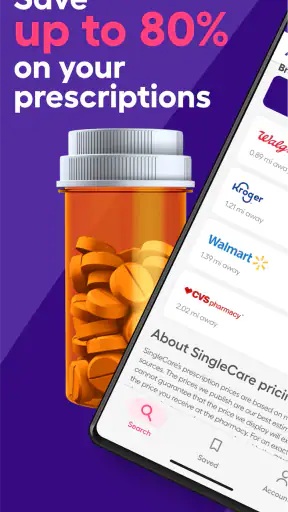
Developed by RxSense, this free medical app is designed for people who want to look for prescription savings before paying. Its store summary focuses on free Rx coupons and potential savings of up to 80%, but the practical value depends on the medication, pharmacy, location, and price available at that moment. I would treat every displayed amount as something to check at the counter, not as a guaranteed final bill.
The app is available to an Everyone audience, runs on Android versions from 7.0 onward, and has built a substantial user base, with over a million installs. Its average rating is 4.6 from around ten thousand ratings, which suggests that many people find the basic idea worthwhile. Still, a strong rating does not remove the need to understand how prescription pricing works.
Where the experience usually gets stuck
The first point of friction is often not the app itself but the information entered into it. A prescription name may have several forms, strengths, or dosage types. Searching for a brand when the pharmacy uses a generic equivalent, or choosing the wrong strength from a list, can lead to a price that does not apply to the prescription in your hand.
I recommend slowing down at this stage. Check the medication name, strength, form, and quantity against the prescription label. “Tablet” and “extended-release tablet,” for example, should not be treated as interchangeable choices. If the app presents several similar results, selecting the closest-looking one without checking the details is an easy way to create confusion later.
A second sticking point is the pharmacy selection. A coupon price is connected to a particular pharmacy and prescription detail, so choosing a nearby branch or a familiar chain is not enough by itself. Before relying on the result, I would confirm that the selected location is the one where you actually plan to collect the medication.
There is also a common misunderstanding about insurance. A discount coupon is generally an alternative way to price a prescription, not an extra discount that can simply be stacked on top of an insurance claim. At the counter, ask the pharmacy team to compare the available options and clarify which price is being used. If your insurance copay is lower, the coupon may not help. If the coupon is lower, the pharmacy can explain whether it can be processed as a cash-style discount instead.
The most important habit is to compare the final pharmacy price rather than assuming the first coupon result is automatically the best choice. A result can be useful as a reference while still needing confirmation by the pharmacist.
Small setup checks that prevent bigger problems
When I prepare to use SingleCare, I begin with the prescription itself, not with a guessed medication name. I check the spelling, dosage strength, form, and quantity. This is particularly important for prescriptions that have both immediate-release and extended-release versions, or medicines sold under both brand and generic names.
Next, I check the selected pharmacy carefully. If I am traveling, I search for the location where I will actually pick up the prescription rather than the pharmacy closest to my home. A coupon that looks attractive for one location may not be the same at another. This is one reason I would avoid taking a screenshot of an old result and assuming it will still apply later.
The app is free to download and use, which removes an obvious barrier, but “free” does not mean every prescription will become inexpensive. Some medicines may produce little or no advantage compared with insurance or the pharmacy’s normal cash price. I see the app as a way to check an option, not as a promise that every search will produce a dramatic saving.
If the app asks for information during normal use, I would enter only what is needed to identify the prescription and pharmacy. I would also read each screen before continuing, especially when moving from a search result toward using a coupon. A careful review of the medication details is more useful than rushing through setup simply because the app appears straightforward.
The current version is 7.0.8. Keeping the app updated is a sensible first check if a screen behaves differently from what you expect, particularly when a search or coupon display does not load properly. On Android, the minimum supported operating system is 7.0, so very old devices may need attention before troubleshooting the app itself.
A realistic pharmacy workflow
Imagine that I receive a new prescription after a routine appointment. Before leaving for the pharmacy, I open the app, search for the medicine, verify the strength and form, and select the pharmacy branch I intend to use. I then review the displayed coupon information and keep the result available while traveling to the store.
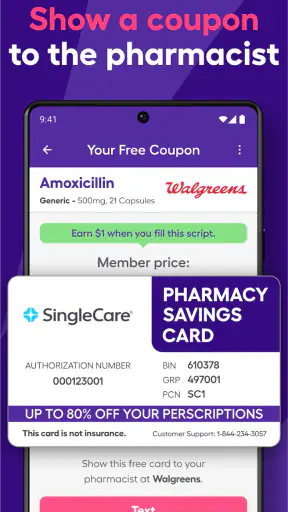
At the pharmacy, I would not simply announce that the app showed a certain price. I would show the coupon information and ask the staff to run it for the exact prescription. I would also ask them to compare it with my insurance price if I have coverage. This two-price check is more reliable than choosing based only on the number I saw earlier.
If the pharmacy cannot process the coupon immediately, I would first confirm that the prescription details match. A mismatch in strength, quantity, or formulation can explain the problem. I would then ask whether the pharmacy has entered the correct location and whether the prescription is being processed through insurance instead. These questions are practical and avoid treating a normal billing difference as an app failure.
For a refill, I would repeat the check instead of assuming that the previous result remains valid. The medication may be the same, but the quantity, pharmacy, or available price can change. Saving a previous result can be convenient, yet rechecking before payment is the safer workflow.
How to recover when the result does not work
When a search produces an unexpected result, I start by returning to the medication details. I check whether I selected the brand or generic version intended by the prescription and whether the dosage form is correct. If several entries look similar, I compare each one with the label rather than choosing the first result.
If the price seems wrong, I check the pharmacy location next. A nearby store may belong to the same chain but still require a different selection. I also make sure I am not comparing an insurance copay with a coupon price as though they were the same type of transaction.
When a coupon cannot be used at the counter, I ask the pharmacist what specifically prevented processing. The answer may involve the prescription details, the selected pharmacy, or the way the claim was being handled. If the staff cannot use the result, I would not argue from the app screen; I would ask whether they can explain the available cash and insurance prices and then decide which option is appropriate.
For a display or loading problem, I would use ordinary checks first: confirm the device has a working internet connection, close and reopen the app, and make sure the installed version is current. If the problem continues, trying the search again later can distinguish a temporary issue from a repeatable one. I would avoid repeatedly submitting slightly different medication searches, because that can make it harder to identify whether the original details were incorrect.
Another useful recovery step is to search using the exact medication wording from the prescription container or written instructions. Guessing from memory is especially risky with medicines that have similar names. If I still cannot identify the correct entry, I would ask the pharmacist rather than making a medical decision based on a search result.
When the app is not the cause
Prescription pricing has several moving parts, and the app cannot control all of them. The pharmacy may have its own cash price, your insurer may apply a deductible or coverage rule, and the prescription may be written for a version that differs from the one selected in the search. A difference between the displayed coupon amount and the final price does not automatically mean the app malfunctioned.
It is also possible for the pharmacy to have limited stock or to need clarification from the prescriber. In that situation, changing the coupon will not solve the underlying delay. The right next step is to ask the pharmacy whether the issue concerns availability, the prescription itself, or payment processing.
I would be especially careful with medications where the exact formulation matters. A discount search should never be used to substitute one medicine for another, change a dose, or choose a different release type. SingleCare can help compare payment options, but it is not a replacement for a clinician or pharmacist when the prescription details are unclear.
People with insurance should also think beyond the immediate price. A coupon transaction may not work like an insurance claim, so it may not contribute to a deductible or other plan tracking. The app is therefore more useful for comparing today’s out-of-pocket cost than for answering every long-term insurance question. For an expensive or recurring prescription, I would ask the insurer and pharmacist how each payment route affects the broader plan.
Those who receive assistance through a government program should be equally cautious and ask the pharmacy which payment methods are permitted. The app can present a discount option, but eligibility and payment rules belong to the relevant program and pharmacy. When the rules are unclear, professional confirmation is more important than chasing the lowest-looking number.
Who benefits most from SingleCare
I think this app is a good fit for people who pay cash for prescriptions, have a high insurance copay, or want a second price to discuss with their pharmacy. It is also useful for families managing several prescriptions, because checking a coupon before leaving home can prevent an unpleasant surprise at the counter.
It can be particularly practical for occasional prescriptions. If I need a short course of medication and do not know whether insurance or the pharmacy’s normal price is better, a quick comparison gives me another option. The same applies when visiting a different pharmacy while traveling, provided I select the correct location and verify the result in person.
People who regularly compare prices may appreciate the app more than someone who always uses one insurance plan without question. Its real strength is not medical guidance; it is helping users approach prescription payment with more information. That distinction keeps expectations realistic.
On the other hand, I would not recommend relying on it as the only tool for urgent medication decisions. If a prescription is time-sensitive, spending too long comparing small price differences may not be worthwhile. I would also hesitate to use it as the main solution for complicated insurance disputes, prior authorization problems, or questions about whether a medicine is clinically suitable.
Someone who expects every pharmacy to accept every displayed coupon may also become frustrated. The app can make the comparison easier, but the pharmacy still has to process the prescription correctly. Users who dislike checking details at the counter may prefer to ask their pharmacist directly for the lowest legitimate price.
How it compares with usual alternatives
The most obvious alternative is using insurance without checking anything else. That is simpler and often appropriate, especially when the copay is already low. SingleCare earns its place when the insurance price is unexpectedly high or when a person is paying without coverage.
Another alternative is asking the pharmacy for its normal cash price. This is valuable because it gives a direct, current answer from the store, but it may require waiting until you are already at the counter. Using the app before leaving gives you a reference point and can make that conversation more focused.
Calling several pharmacies can sometimes produce a better comparison, particularly for a costly prescription, but it takes more time. SingleCare is more convenient for an initial check, while phone calls or pharmacist conversations remain better when the medication is complicated or the price difference matters greatly.
Finally, a pharmacist can explain issues that a discount search cannot, including formulation differences, insurance processing, and prescription availability. I would use the app to prepare for that conversation, not to replace it. The strongest workflow combines the app’s price check with the pharmacy’s professional confirmation.
My practical verdict
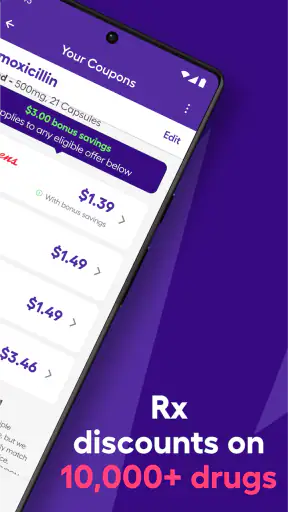
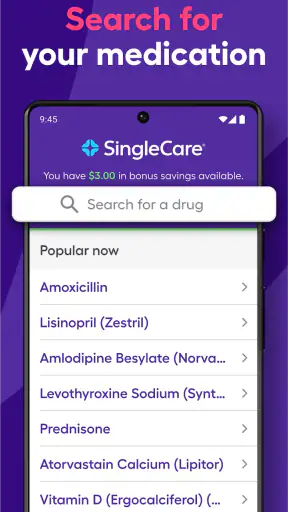
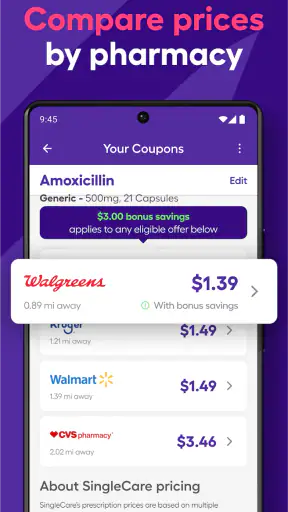
After using SingleCare as a prescription savings reference, I see it as a helpful, free addition to a careful pharmacy routine. RxSense has made the central task easy to understand: search for the prescription, choose the pharmacy, review the coupon information, and compare it with the price you can actually receive.
The app is not a magic price guarantee, and the most important work still happens in the details. Correct medication selection, correct pharmacy location, and a final check with the pharmacist determine whether the result is useful. That may sound like extra effort, but it is also what prevents an attractive-looking search result from turning into confusion at checkout.
With a 4.6 average and around ten thousand ratings, it has earned a positive response from many users, and its broad install base makes it a familiar option in the medical category. Its age rating of Everyone also makes it approachable for households managing prescriptions together, although each person should still handle medical decisions with appropriate professional guidance.
My recommendation is straightforward: install it if you want a quick way to compare prescription payment options, especially when paying cash or facing a high copay. Use it before the pharmacy visit, verify every prescription detail, and ask the pharmacist to compare the coupon with insurance and the normal cash price. If you need medical advice, insurance interpretation, or an urgent prescription filled without delay, go directly to the pharmacist or relevant healthcare professional instead.
SingleCare is at its best as a practical price-checking companion, not as a substitute for insurance knowledge, pharmacy judgment, or medical care. Used with that expectation, it can make an otherwise frustrating prescription purchase more manageable and may help you find a better payment route when the obvious one is not the cheapest.


